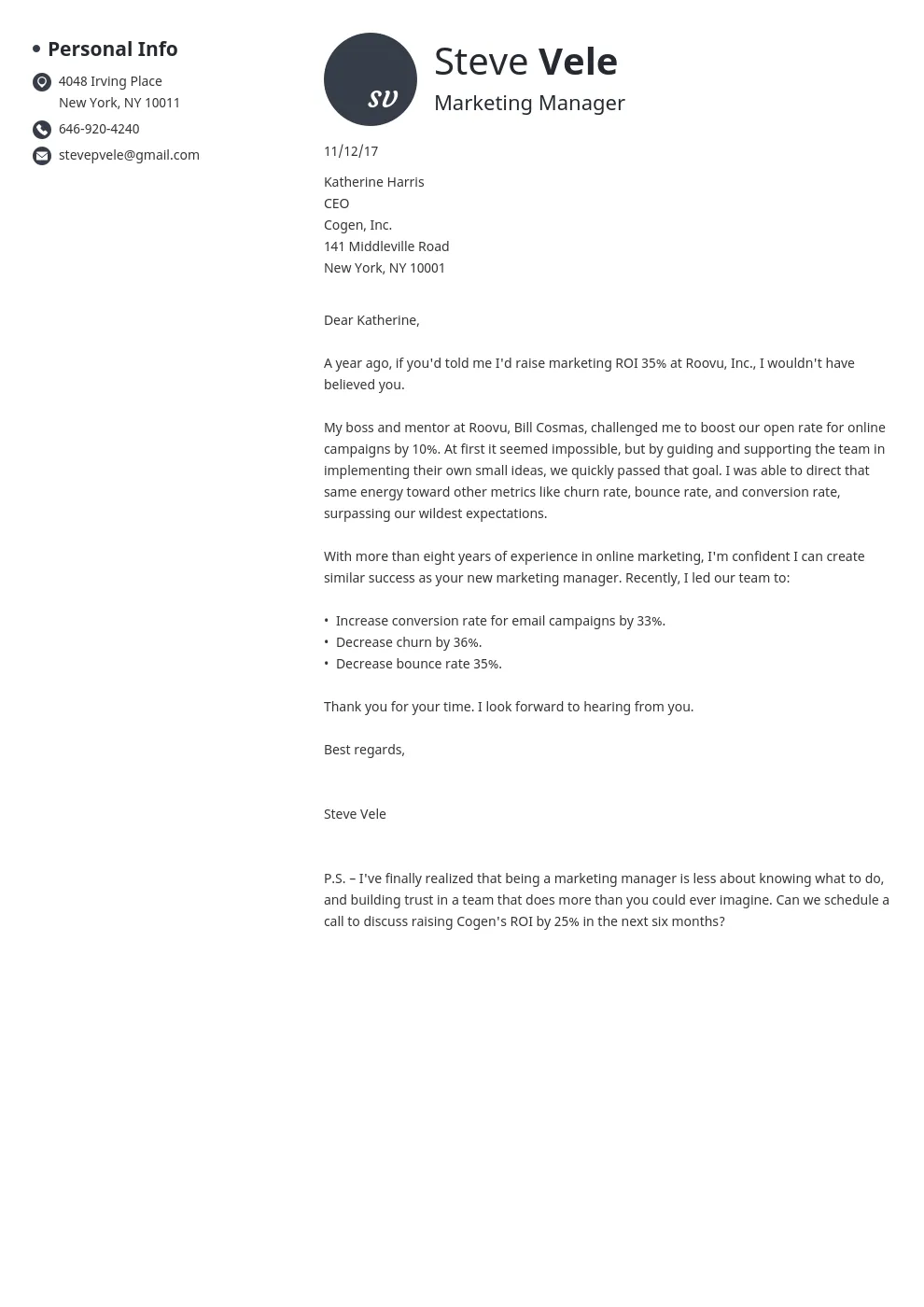
What is a Cover Letter
A cover letter is a crucial document that accompanies your resume when you apply for a job. It serves as a personal introduction and allows you to showcase your personality, skills, and qualifications in a more detailed and engaging way than your resume alone. Think of it as your first opportunity to make a strong impression on a potential employer. A well-crafted cover letter can significantly increase your chances of landing an interview, setting you apart from other applicants and demonstrating your genuine interest in the position.
Why is a Cover Letter Important
Cover letters are important for several reasons. They provide context to your resume, helping the hiring manager understand how your skills and experiences align with the job requirements. They also allow you to personalize your application and demonstrate your understanding of the company and the specific role. Furthermore, a cover letter offers an opportunity to highlight achievements and quantify your contributions, making your application more compelling. In many cases, a cover letter is a required part of the application process and provides a chance to address any gaps in your experience or explain your career goals.
Key Elements of a Cover Letter

A well-structured cover letter generally includes several key elements that work together to create a compelling narrative. These elements include a professional header, a personalized greeting, a concise introduction, compelling body paragraphs, and a strong closing. The body paragraphs should highlight your relevant skills and experiences, while the closing should express your enthusiasm for the role and reiterate your interest in an interview. The entire document should be carefully proofread and formatted to ensure readability and professionalism. (cover_letter_elements.webp)
Header Basics
Your header is the first thing the hiring manager sees, so it should be clean, professional, and easy to read. Start with your full name, contact information (phone number and email address), and optionally, your LinkedIn profile URL. Ensure your contact information is accurate and up-to-date, as this is how employers will reach you. The header should be consistently formatted throughout the document, and it’s a good idea to use a standard font like Arial or Times New Roman. Keep the design simple and avoid any unnecessary graphics or embellishments, maintaining a professional look that reflects your attention to detail (cover_letter_basics.webp).
Your Contact Information
Include your full name, phone number, and professional email address. Make sure your email address sounds professional, using your full name or a variation of it. Double-check the phone number to ensure accuracy. It’s crucial that your contact information is current so employers can easily get in touch with you. Consider adding your LinkedIn profile URL; this allows employers to quickly view your professional background and learn more about your experience.
Date and Recipient Information

Below your contact information, include the current date. Then, add the recipient’s information: their name, title, and the company’s address. If you know the hiring manager’s name, use it; otherwise, use a general greeting like “Dear Hiring Manager.” This shows that you have tailored your letter specifically for the company. If you are applying online, you may not need a physical address; you can just put the name and title of the person you are writing to.
Greeting the Hiring Manager
The greeting sets the tone for your cover letter, so choose it carefully. If you know the hiring manager’s name, use “Dear Mr./Ms./Mx. [Last Name].” This personal touch shows you’ve done your research. If you don’t know the hiring manager’s name, use “Dear Hiring Manager” or “Dear [Department Name] Team.” Avoid generic greetings like “To Whom It May Concern,” which can make your letter seem impersonal. The goal is to create a positive and professional first impression.
Body Paragraph Essentials
The body of your cover letter is where you demonstrate why you are the right fit for the job. Start with a strong opening paragraph that grabs the reader’s attention. The middle paragraphs should highlight your relevant skills and experiences, using specific examples to support your claims. Quantify your achievements whenever possible to show the impact you’ve made in previous roles. Tailor the content to match the job description, emphasizing the skills and experiences the employer is looking for. Conclude with a call to action that expresses your enthusiasm and invites the hiring manager to contact you for an interview (writing_skills.webp).
Opening Paragraph Hook

The opening paragraph should immediately capture the reader’s attention and state your purpose. Briefly mention the position you’re applying for and how you learned about it. You can start with a compelling statement about your interest in the company or the role. This sets the stage for the rest of your letter. Keep it concise, using a few sentences that showcase your enthusiasm and state your primary objective, which is to secure an interview.
Highlighting Your Skills
Focus on the skills that are most relevant to the job description. Identify the key requirements listed by the employer and demonstrate how your skills align with those requirements. Provide concrete examples of how you’ve used these skills in the past, such as through projects, previous roles, or academic achievements. This is your opportunity to showcase your abilities and show how you can contribute to the company’s success.
Showcasing Your Accomplishments
Instead of simply listing your responsibilities, highlight your accomplishments. Use the STAR method (Situation, Task, Action, Result) to structure your examples: describe the situation, the task you were assigned, the actions you took, and the results you achieved. Quantify your achievements whenever possible by using numbers, percentages, or specific metrics to demonstrate the impact of your work. For example, instead of saying “Improved customer satisfaction,” say “Increased customer satisfaction by 15% through implementation of a new support system”.
Expressing Your Enthusiasm

Throughout your cover letter, express your enthusiasm for the position and the company. Show that you’ve done your research and understand the company’s mission, values, and products or services. Mention specific aspects of the role or the company that excite you. Your genuine interest in the opportunity should be evident in your tone and choice of words, making your letter more engaging and memorable.
Tailoring the Letter
Customize each cover letter for the specific job you are applying for. Avoid using a generic template, as this makes your application seem impersonal. Carefully review the job description and identify the key skills, experiences, and qualifications the employer is looking for. Then, tailor your cover letter to highlight how you meet those requirements. This shows that you have taken the time to understand the role and are genuinely interested in the opportunity. (tailoring_cover_letter.webp)
Call to Action and Closing
Your closing paragraph should include a call to action and express your gratitude. Reiterate your interest in the position and state that you look forward to hearing from the hiring manager. Make it clear that you are available for an interview and provide your contact information once more. End the letter with a professional closing, such as “Sincerely,” or “Best regards,” and sign your name. Make sure your signature is clear and legible.
Expressing Gratitude

Thank the hiring manager for their time and consideration. This shows your appreciation and professionalism. Expressing gratitude leaves a positive impression and reinforces your interest in the role. It’s a simple but effective way to end your letter on a positive note. This adds a touch of politeness and respect, making your application more appealing.
Finalizing the Closing
End your cover letter with a professional closing and your full name. Common closings include “Sincerely,” “Best regards,” or “Thank you for your consideration.” Ensure your signature is clear and easy to read, either typed or, if submitting a physical copy, signed neatly. This shows you’ve paid attention to the details. The concluding words should reflect your professionalism and your confidence in your application.
Proofreading and Formatting
Before you send your cover letter, carefully proofread it for any errors. Ensure your letter is free of grammatical errors, typos, and inconsistencies. Use a professional font and formatting to make your letter easy to read. Pay close attention to details like spacing, margins, and alignment. A well-formatted and error-free cover letter demonstrates your professionalism and attention to detail, increasing the likelihood of making a positive impression on the hiring manager. (proofreading_cover_letter.webp)
Proofreading Checklist

Use a proofreading checklist to catch any mistakes. Check for spelling errors, grammatical errors, and punctuation mistakes. Ensure that your sentences are clear and concise. Verify that your contact information is accurate. Ask a friend, family member, or career counselor to review your letter for a fresh perspective. A second pair of eyes can often catch errors that you might have missed, so getting feedback is always a good idea.
Formatting for Readability
Format your cover letter for readability. Use a professional font like Arial or Times New Roman, with a font size between 10 and 12 points. Use single spacing within paragraphs and double spacing between paragraphs. Keep your margins at 1 inch on all sides. Use clear and concise language and avoid long, complex sentences. Divide your cover letter into logical paragraphs, each focusing on a specific point. This will help the hiring manager easily scan your letter and understand your key qualifications.
Final Touches Before Sending
Before sending your cover letter, take a few final steps to ensure it’s ready. Review the entire letter one last time to ensure it’s free of errors. Make sure the letter is tailored to the specific job and company. Save your cover letter in a professional file format, such as PDF, to preserve the formatting. By taking these final steps, you can be confident that your cover letter is polished, professional, and ready to make a positive impression. (cover_letter_examples.webp)
Review and Edit
Before submitting, review your cover letter again. Check for any inconsistencies in your formatting or content. Ensure that your tone is appropriate for the job and the company. Look for any awkward phrasing or unclear statements, and revise them to be more concise and effective. Make sure your letter aligns with your resume, and that all information presented is accurate. Reviewing and editing your cover letter is critical to making a positive impression.
Sending Your Cover Letter
When submitting your cover letter, follow the application instructions carefully. Attach your cover letter and resume in the required format (usually PDF). If sending via email, write a concise and professional subject line, such as “Application for [Job Title] - [Your Name].” In the email body, briefly reiterate your interest and thank the hiring manager for their time. Always double-check that you’ve attached the correct documents before sending. (submitting_cover_letter.webp)